.png)
Block unwanted ads and websites with this software
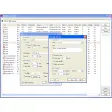
WebSite Blocker is a network software that can block ads and adult materials. There are several reasons why websites should be blocked. It’s not uncommon for unsavory websites to carry malicious software that could damage your machine or infiltrate your personal information. Website Blocker prevents this by blocking these websites from being accessed. One problem with this program, however, is that it’s unclear how it updates its database. There does not seem to be any options to do this. That said, if you happen to find the website that you want blocked from your PC in the software, go ahead and use it.





























User reviews about WebSite Blocker
by Anonymous
Free website blocker.
Use this https://chrome.google.com/webstore/detail/free-website-blocker-pass/konkmpfpnnpndcmnmbiaamlfaikhhcga
by Anonymous
Quite good but not at all.
This program is made to use for blocking unwanted pop-up and harmful websites. It has its advantages and disadvantages by the time. One advantage is that it is a small program, just 281KB. Then it will be installed and take your 1.4MB hardisk space. It is free and from trusted and good programmer organization called "Softonic". When you download this program, no worry to have with this download because of trusted from 30 of virus scanning programs. After installation, you can use it and understand what its functions could work and how.
Otherwise, there are also disadvantages to using this program. The first downside is that WebSite Blocker can't block the website that never opened before. For kids, who doesn't have time to look after them when they surf over the internet, it doesn't help you with this problem. This program doesn't know which are harmful, with violent pictures, terrible sites or even adults sites only. Eventually, it is usable program for website blocking.
Pros:
small
Cons:
less function More